If you’re ready to harness the power of numbers to optimize your Etsy shop but haven’t installed (or upgraded) Google Analytics yet, don’t wait any longer!
Here are the complete, accurate instructions for connecting Google Analytics 4 with an Etsy shop.
You will learn:
What login to use for Google Analytics
Whether to create a new Google Analytics Account or use one you already have
All the most effective, up-to-date settings to apply inside Google Analytics
How to link your new Google Analytics tracking number to Etsy
How to test everything is working
What to do next to start looking at your visitor numbers and behaviour!
⚠️ You need to follow these instructions even if your Google Analytics 4 Property was created automatically and you had the old GA version (Universal Analytics) connected to Etsy.
⚠️ IMPORTANT! These instructions are for GA Universal Analytics and are no longer applicable.Etsy now supports GA4.
The out-of-date article below is available to read if interested. If the topic is still relevant in GA4, it might be updated in the future.
POP QUIZ: Can Google Analytics answer this question?
“How do people find my Etsy store?”
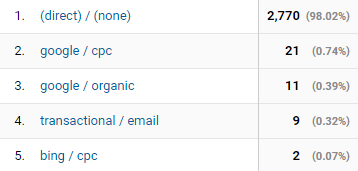
At first, Google Analytics looks like it has all the answers! There in your reports, you see: direct traffic, referrals, a few from Facebook and other social media… Isn’t that how they got there?
ANSWER: Nope! Not unless you follow the instructions in this guide.
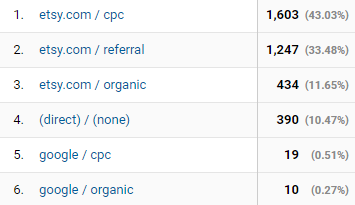
Well, that means that any of the traffic sources you see in Google Analytics could show how that person found the Etsy home page or an entirely different shop before they navigated to yours within Etsy. Half your so-called social media traffic could be from other people’s marketing! (And not in a good way…)
Even worse, Google Analytics doesn’t show you how people found your shop within Etsy, which makes up the bulk of your traffic. Etsy search, clicks from favorites or recently viewed, promoted listings: all hidden.
That kinda sucks.
Where’s all the Etsy traffic? Probably in “(direct) / (none)”…
A long time ago, when I worked in retail, I envied the prim, organised merchandisers whose sole responsibility was (as far as I could tell from behind the counter) to fluff around with enticing displays of gifts and stationery.
I know I’m not the only one!
Now as Etsy sellers, we get to “merchandise” our own online shops every day.
Check how our listing thumbnails look all together in the catalogue.
Pour over a new product page to make sure every detail is perfect.
Go through our shop policies with a fine tooth comb to make sure we aren’t accidentally committing to replacing unwanted items with a lifetime supply of Starbucks…
And I know—because I’ve spent my fair share of time there—that we do a lot of this “fluffing around” in our public shop front. You know – the exact same view that our buyers see.
The pages of our shop where our Google Analytics code runs. Those pages.
Reading and understanding the numbers around your shop’s traffic is super important. If you can do this, you can better understand where you should focus your marketing, what parts of your shop could be improved, and make sure you’re seeing real benefits from all your promoting efforts.
(And we know promotion needs A LOT of effort!!)
There are two sources for this information: Etsy’s built-in Stats and Google Analytics (“Analytics” or just “GA”). They both have their pros and cons, so you’ll most likely continue to use both hand-in-hand to gauge your performance. But when should you use each one?
Not all traffic is equal. It’s incredibly important to be able to identify valuable visitors.
Visits that lead to sales.
Unfortunately, you can’t track Etsy sales in Google Analytics right now, but that doesn’t mean you can’t have conversion rates. I’m not talking purchase conversions here (sales) but goals that imply something good: engagement, getting-close-to-the-sale-ness. Then you can say what percentage of your visits met this criteria, and whether some traffic sources, products etc. performed better than others.
Let’s call this an Engagement Rate!
IMPORTANT: These instructions are for Universal Analytics. Google Analytics 4 comes with built-in Engagement and Engagement Rate metrics that measure roughly the same visitor behaviour – yay!
These instructions are for Universal Analytics only. Referral spam is less of a problem these days (2022 onwards) and in Google Analytics 4, which Etsy now supports.
If you’re here, you’ve probably noticed something weird going on in your Google Analytics reports. And if you haven’t noticed anything weird, follow along and you might get a surprise.
Analytics can usually tell you, very precisely, where your visitors came from, both geographically and on the web. As you’ll find out in future posts, that’s tricky to get right when you run an Etsy shop, but there’s one problem that almost every site has these days: referral spam.
“Referral spam” is when useless, fake or malicious websites show up as having sent traffic to your site. They haven’t. At least not real people visitors.
This article might be useful to you when analysing historical data from your Universal Analytics account, after you back it up.